
Frequently Asked Questions about the SRF and RAP
We have come up with a 'Frequently Asked Questions' page for the SRF and the RAP. Most of these questions are those which our customers have asked, while some we came up with ourselves to help you in filling out the forms better and faster.
We have grouped the FAQ's based on the categories below. Click on a link and you will be taken to the FAQ's for that category.
| » Getting started | » Filling out the forms | |
| » Email notifications | » Categories of Work on the SRF | |
» Getting started
- What software do I need to be able to use the new forms?
- When I click on either form, it prompts me to log on. How do I log on?
- How do I know which form to use?
| -------------------------------------------------------------------------------------------------------------------------------------------- | |
| What software do I need to be able to use the forms? | |
All you need to be able to use our forms is a web browser. While Microsoft Internet Explorer is recommended, you may use any of the browsers listed below which we have tested for compatibility:
|
|
| [to top] |

 Apple Safari
  Google Chrome
| -------------------------------------------------------------------------------------------------------------------------------------------- | |
| When I click on either the SRF or RAP icon, it prompts me to log on. How do I log on? | |
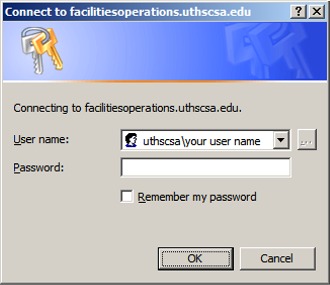
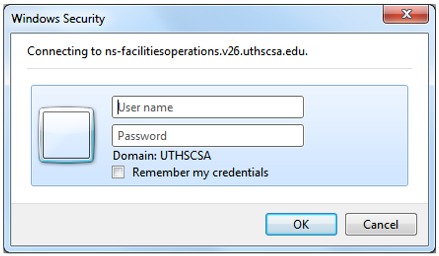
| Depending on the type of computer (PC or Mac) you are using, you may encounter one of the following log-on prompts. Also, if you are using a PC the version of Windows installed on your computer will dictate how you will log on.
If you are using a PC that has Windows XP, this is what the log-on prompt typically looks like:
To log on, enter your login in the User name field this way: uthscsa\your user name If you are using a PC that has Windows 7 or if you are using a Mac, this is what the log-on prompt typically looks like:
To log on, simply enter your login and password credentials in the appropriate areas.
|
|
| [to top] |
| -------------------------------------------------------------------------------------------------------------------------------------------- | |
| How do I know which form to use? | |
| Use the SRF if you want Facilities Management to provide services for which your department will pay for. These 'Department-Funded Services' range from the painting of rooms to setting up for special events to office renovations. The RAP is most effective when used to report to Facilities Management incidents which are pertinent to the operation, maintenance, and upkeep of HSC facilities. Examples of these 'FM-Funded Services' - services rendered free of charge by FM - include roof leaks as a result of rains, inoperable restroom equipment, and other-than-normal room temperature. For more information, read ' Overview of Services'. |
|
| [to top] |
» Filling out the forms
- Is there a time limit as to how long the approver needs to act on a request?
- Can the approver make changes to my request? What happens to my original request?
- How long will it take for Facilities Management to review and process my request?
- The room which I'm requesting work for is not listed. What do I do?
- I get a "script error" when I choose a Room number. How do I fix this?
- My room number, 258, is shown as 2.258 in the rooms drop-down list. Why is this?
- Are incidents reported on Report-A-Problems given the same urgency as incidents that are called in?
- Do I need to specify a "Point of Contact"?
- When can I print the form?
| Is there a time limit as to how long the approver needs to act on a request? | |
| No. The request will remain pending until the approver makes the decision to approve or disapprove. | |
| [to top] |
| -------------------------------------------------------------------------------------------------------------------------------------------- | |
| Can the approver make changes to my request? What happens to my original request? | |
| Yes. If changes are needed on the request, the approver can make the changes when he/she opens the form for review. Once the form has been amended, the approver re-submits the form. | |
| [to top] |
| -------------------------------------------------------------------------------------------------------------------------------------------- | |
| How long will it take for Facilities Management to review and process my request? | |
| Facilities Management reviews requests as they come in and will have completed the review process within minutes. Part of the review process is to determine if the request is valid and if all information pertinent to the work being requested has been provided on the form. The Work Control Center tasked with reviewing the request can only approve or disapprove the request. It cannot return the request to the department so that the form may be re-submitted with additional or corrected information. In other words, if a request is valid, an official Work Order number is issued against the request. However, if the request is invalid the request is disapproved and the requestor is notified. | |
| [to top] |
| -------------------------------------------------------------------------------------------------------------------------------------------- | |
| The room that I'm requesting work for is not listed. What do I do? | |
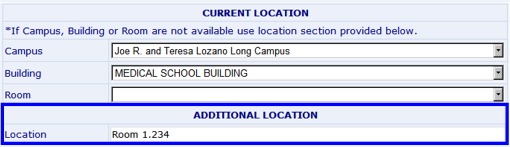
| In every place in the form that asks for the Campus, Building and Room, there is a section right below it that allows you to enter the exact location of the work you are requesting if that location is not selectable from the lists. For example, if Room 1.234 is not listed among the rooms for the Medical School building, simply type in "Room 1.234" in the additional location section. If the location where the work is being requested is not a room but rather a general area such as a "parking lot" or "lobby", you may type as such in the Additional Location section as well.
|
|
| [to top] |
| -------------------------------------------------------------------------------------------------------------------------------------------- | |
| I get a "script error" when I choose a Room number. How do I fix this? | |
| This is a confirmed issue that occurs when the requestor selects a Room number from the list of rooms that belong either to the Dental School or Medical School building. The error seems to occur only when the Microsoft Internet Explorer browser is being used. The cause of this error is due to the number of rooms belonging to both buildings. As the requestor selects the building from the dropdown list, the browser queries the list of rooms for that building. Given the number of rooms for each building, the query or script "times out", resulting in the error. To get rid of the error, click on the 'No' button so you may proceed with the rest of the form.
|
|
| [to top] |

| -------------------------------------------------------------------------------------------------------------------------------------------- | |
| My room number, 258, is shown as '2.258' in the rooms drop-down list. Why is this? | |
| The Room numbers listed in the rooms drop-down list are known as "doorplates". The first digit of the doorplate indicates the level or floor where the room is located. Using doorplates is a more precise means of identifying where the work will be performed. | |
| [to top] |
| -------------------------------------------------------------------------------------------------------------------------------------------- | |
| Are incidents reported on Report-A-Problems given the same urgency as incidents that are called in? | |
| Yes. The Maintenance and Operations Work Control Center (for electrical, structural and custodial issues) and the Utilities Control Room (for temperature and ventilation-related events) monitor incoming RAPs around-the-clock and process them as they come in with the same necessity if the incident were reported by phone. In fact, with the RAP system, customers who have reported valid problems are advised of the Facilities Management Work Order number that has been assigned to the reported incident. The Work Order number provides the customer a means of reference to the incident that was reported. | |
| [to top] |
| -------------------------------------------------------------------------------------------------------------------------------------------- | |
| Do I need to specify a "Point of Contact"? | |
| If the point of contact for the SRF is someone other than yourself - this could be the person whom you have requested the services for - then fill out the Point of Contact fields on the form. | |
| [to top] |
| -------------------------------------------------------------------------------------------------------------------------------------------- | |
| When can I print the form? | |
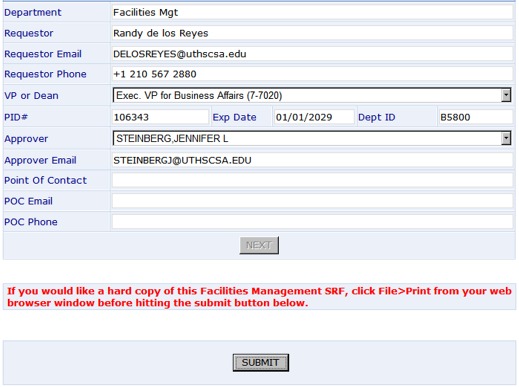
| You may print the form right after you have filled out the 'Department Information' section and right before you click on the 'Submit' button.
|
|
| [to top] |
» Email notifications
- Will I get an email confirming that I have submitted a request?
- How will the approver whom I have selected be notified of my request?
- How do I know if my approver has acted on a request?
- How do I know if my request has made its way to Facilities Management?
- How do I know if my request has been approved or rejected by Facilities Management?
- I'm the designated approver for an SRF but I accidentally deleted the email that contains the link to the form. How do I fix this?
- I received an email advising me that the RAP I submitted is invalid. Should I reply to the email and ask for additional information?
| -------------------------------------------------------------------------------------------------------------------------------------------- | |
| Will I get an email confirming that I have submitted a request? | |
| Yes. Within seconds of clicking on Submit, you will receive an email confirming that you have successfully submitted a request. If you have submitted an SRF, the request will be sent to the approver that you have chosen to review your request. If you have submitted a RAP, the request will be sent to the Facilities Management Work Control Center that specializes in the nature of the problem you reported on the form. |
|
| [to top] |
| ------------------------------------------------------------------------------------------------------------------------------------------- | |
| How will the approver whom I have selected be notified of my request? | |
| The approver that you selected to review your request will receive an email. The email will contain a link to the form you filled out so that the approver can open the form, review the request, and decide whether to approve or disapprove the request. POC gets email if approved. | |
| [to top] |
| -------------------------------------------------------------------------------------------------------------------------------------------- | |
| How do I know if my approver has acted on a request? | |
| You will receive an email indicating what action your approver has taken on your request. If the request was approved, the request is then sent to the Facilities Management Work Control Center tasked with reviewing the request. If the request was disapproved, the process ends. |
|
| [to top] |
| -------------------------------------------------------------------------------------------------------------------------------------------- | |
| How do I know if my request has made its way to Facilities Management? | |
| You will receive an email advising you that the request has been approved. The request is then sent to the Facilities Management Work Control Center tasked with reviewing the request. | |
| [to top] |
| -------------------------------------------------------------------------------------------------------------------------------------------- | |
| How do I know if my request has been approved or rejected by Facilities Management? | |
| You will get an email indicating whether your request has been approved or disapproved: If the request is approved, the email will contain the official Facilities Management Work Order number issued against the SRF or the RAP; If the request is disapproved, the email will contain the reason(s) as to why the request was disapproved. |
|
| [to top] |
| -------------------------------------------------------------------------------------------------------------------------------------------- | |
| I'm the designated approver for an SRF but I accidentally deleted the email that contains the link to the form. How do I fix this? | |
| Contact the FM Work Control Center at 567-2885. They can email you the link to the request for your review. | |
| [to top] |
| -------------------------------------------------------------------------------------------------------------------------------------------- | |
| I received an email advising me that the RAP I submitted is invalid. Should I reply to the email and ask for additional information? | |
| No. Email notifications are automatically generated by an unattended mailbox. If you have questions as to why your RAP request was rejected, contact the Facilities Management Work Control Center which processed your request. Depending on the type of problem you reported, the email you received will show contact information for the Work Control Center which processed your request. For temperature or ventilation-related problems, contact the Utilities Control Room at 567-2945. For structural, electrical and other concerns, contact the Maintenance and Operations Work Control Center at 567-2885. |
|
| [to top] |
» Categories of Work on the SRF
- What do the Pin-On tags, Clip-On tags and all other Engraving products look like?
- Can I request an Engraving product for more than one person on the same SRF?
- Can I request more than one type of Engraving product on the same SRF?
- Does the cost of a wall plate, $11.50, include installation?
- On my Move request, I want the items moved to a location other than the HSC warehouse. How do I indicate this on the form?
- Will my SRF for a Move satisfy all other requirements related to the move?
- What are some examples of events that I can submit an SRF for?
- My event requires a specific arrangement of tables and chairs. Can I attach a diagram to show how the Setup is expected to look?
- What is "Fixed Priced" renovation and what are its benefits?
- What does the "Refresh Your Office" package consists of?
- What are the standard choices for Paint Colors and types of Flooring?
- What does the standard 3-foot shelving unit look like?
- How can I add special instructions or notes to my Renovation request?
- What is a "Program Study"?
| -------------------------------------------------------------------------------------------------------------------------------------------- | |
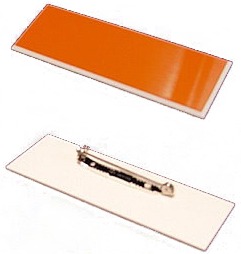
| What do the Pin-On tags, Clip-On tags and all other Engraving products look like? | |
 Desk name plate
|
|
| [to top] |

| -------------------------------------------------------------------------------------------------------------------------------------------- | |
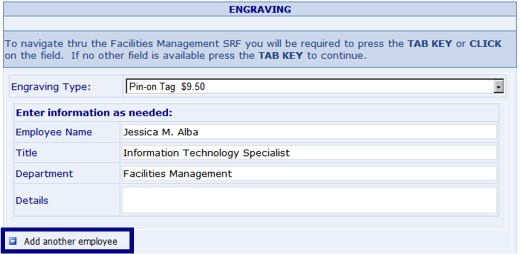
| Can I request an Engraving product for more than one person on the same SRF? | |
| Yes. After providing the information for the first employee, click on the "Add another employee" link and a new set of employee information fields will appear.
|
|
| [to top] |
| -------------------------------------------------------------------------------------------------------------------------------------------- | |
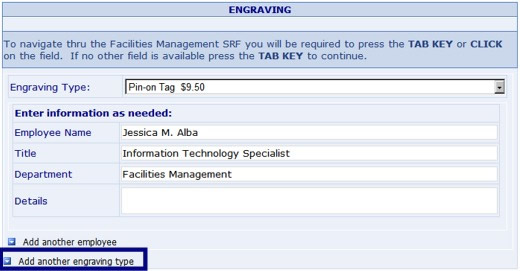
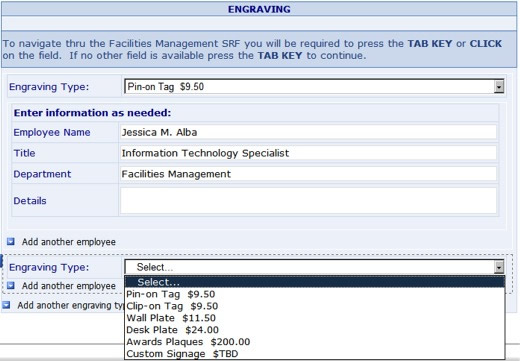
| Can I request more than one type of Engraving product on the same SRF? | |
| Yes. After providing the information for the first employee, click on the "Add another engraving type" link and the "Engraving Type:" menu will appear. Once you have made a selection, a new set of employee information fields will appear.
|
|
| [to top] |
| -------------------------------------------------------------------------------------------------------------------------------------------- | |
| Does the cost of a wall plate, $11.50, include installation? | |
| Yes. Most of the time, our Engravers will handcarry the finished product to the requestor's location and make the installation. | |
| [to top] |
| -------------------------------------------------------------------------------------------------------------------------------------------- | |
| On my Move request, I want the items moved to a location other than the HSC warehouse. How do I indicate this on the form? | |
Most of the moves performed by FM involve the relocation of items to the HSC warehouse. In cases where the destination of the items is not the HSC warehouse, you can indicate that on the form by selecting the proper option button as shown below. Be sure to include any instructions that you want our movers to know prior to the move. 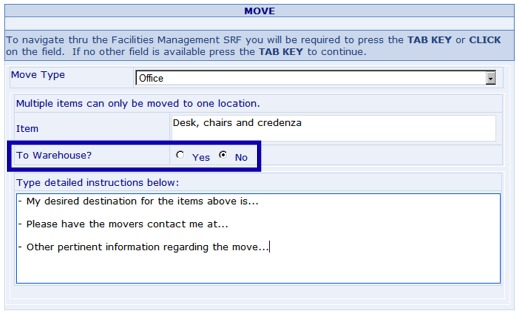 |
|
| [to top] |
| -------------------------------------------------------------------------------------------------------------------------------------------- | |
| Will my SRF for a Move satisfy all other requirements related to the move? | |
| No. Depending on the type of items that you want moved, you might need to furnish the forms listed below to the proper offices. The SRF you fill out for a Move simply indicates that you are requesting Facilities Management to physically relocate the item(s) for you. The SRF does not satisfy requirements by other HSC departments/offices that may be involved in the move. | |
| [to top] |
| -------------------------------------------------------------------------------------------------------------------------------------------- | |
| What are some examples of events that I can submit an SRF for? | |
| Graduation ceremonies, conferences, and special meetings are just some of the many events that customers can submit an SRF for. Facilities Management can provide tables, chairs, trash cans, and mats for the event. | |
| [to top] |
| -------------------------------------------------------------------------------------------------------------------------------------------- | |
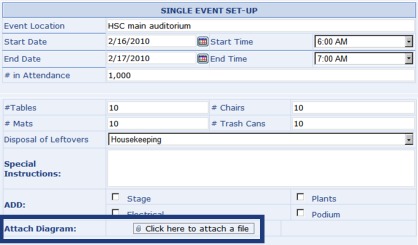
| My event requires a specific arrangement of tables and chairs. Can I attach a file to the form to show how the Set-up is expected to look? | |
| Yes. On the Event Set-up portion of the form, there is an "Attach Diagram" section that allows you to upload a file that will help our Custodial Services Division in planning for the Setup. The file can be an image (.jpg, .bmp, etc.), a Word document, an Adobe PDF file, or any other popular file type.
|
|
| [to top] |
| -------------------------------------------------------------------------------------------------------------------------------------------- | |
| What is "Fixed Priced" renovation and what are its benefits? | |
| Facilities Management's Fixed Pricing provides a means by which our customers can obtain pricing information for commonly requested work. It affords the customer the advantage to budget for a job without the need for an estimate. Facilities Management saw a need to provide a means to complete commonly requested work such as name plates and minor office renovations in a more efficient manner. It also realized the need to reduce the processing time that work orders take from the time it is submitted for entry into the department’s work order management system to the time it is completed and then billed. By providing these “packages”, unnecessary design work is avoided and the flow-through of work in the shops for construction is increased. Click here to view the complete Fixed Price Cost Schedule. |
|
| [to top] |
| -------------------------------------------------------------------------------------------------------------------------------------------- | ||||||||||||||||
| What does the "Refresh Your Office" package consists of? | ||||||||||||||||
The "Refresh Your Office" package, for $2,128 per room, consists of:
|
||||||||||||||||
| [to top] |
| -------------------------------------------------------------------------------------------------------------------------------------------- | |||||||||||||||||||||||||||||||||||||||||||||||||||||||||||||||||||||||||||||
| What are the standard choices for Paint Colors and types of Flooring? | |||||||||||||||||||||||||||||||||||||||||||||||||||||||||||||||||||||||||||||
Paint Colors -
For Accent Paint Colors:
Flooring -
Vinyl Composition Tile (VCT) by Armstrong Commercial Flooring ©
Carpet - Standard
Patcraft © "Homeroom II" series:
Shaw Contract Group © "Constellation" series:
Carpet - Premium
Shaw Contract Group © "Unity" series:
|
|||||||||||||||||||||||||||||||||||||||||||||||||||||||||||||||||||||||||||||
| [to top] |






























| -------------------------------------------------------------------------------------------------------------------------------------------- | |
| When selecting paint or flooring, there's an option for "Variance". What is that? | |
| A variance is permission granted by Facilities Management for the department not to use the standard paint colors and finishes. The request for variance must be signed by either the Dean, Chairman or Vice President of the department. | |
| [to top] |
| -------------------------------------------------------------------------------------------------------------------------------------------- | |
| What does the standard 3-foot shelving unit look like? | |
A 3-foot shelf consisting of three shelves is available as a fixed price option for $265.
« Image to come soon »
| |
| [to top] |
| -------------------------------------------------------------------------------------------------------------------------------------------- | |
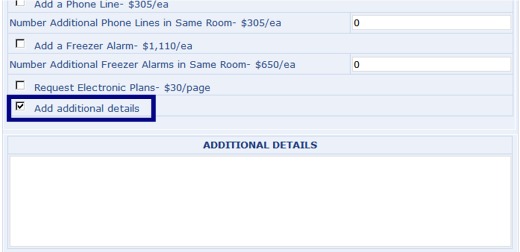
| How can I add special instructions or notes to my Renovation request? | |
| At the end of the list of Fixed Price Renovation Options, you can put a check in the "Add additional details" checkbox and a textbox will appear allowing you to type in notes.
|
|
| [to top] |
| -------------------------------------------------------------------------------------------------------------------------------------------- | |
| What is a "Program Study"? | |
| A Program Study is a concise, quick study that will identify the scope of work for a project based upon customer input and a brief interview with the customer. A sketch of the project location showing the intended work items along with a bulleted scope of work will be prepared. A cover letter from Facilities Management will give a range estimate based upon historical costs and can be used as a budgeting number. Once the programming study is completed, the work order will be closed. Estimates will be representative for the scope of work presented and are good for 90 days. Once the customer procures funding and is committed to proceeding with the project, the customer will submit a new work order using the program study work order as a reference. A full design will be prepared along with an accurate line-item estimate for the customer's review and approval. All costs associated with design services once the project has been resubmitted are fully billable to the department. |
|
| [to top] |